Can an AI coding agent leak your screenshots to public GitHub?
Yes, and it has already happened at more than 300 organisations. Coding agents asked to show reviewers a before-and-after screenshot posted the images to public GitHub repositories, mostly under the developer's own username, where the company's own checks never look. You can't fix this with a written policy. Ask your developers for four things: a current GitHub CLI, a human approval before any agent creates a repo or pushes outside your organisation, a sweep of their personal accounts, and one agreed private place for review screenshots.
How did screenshots end up in public?
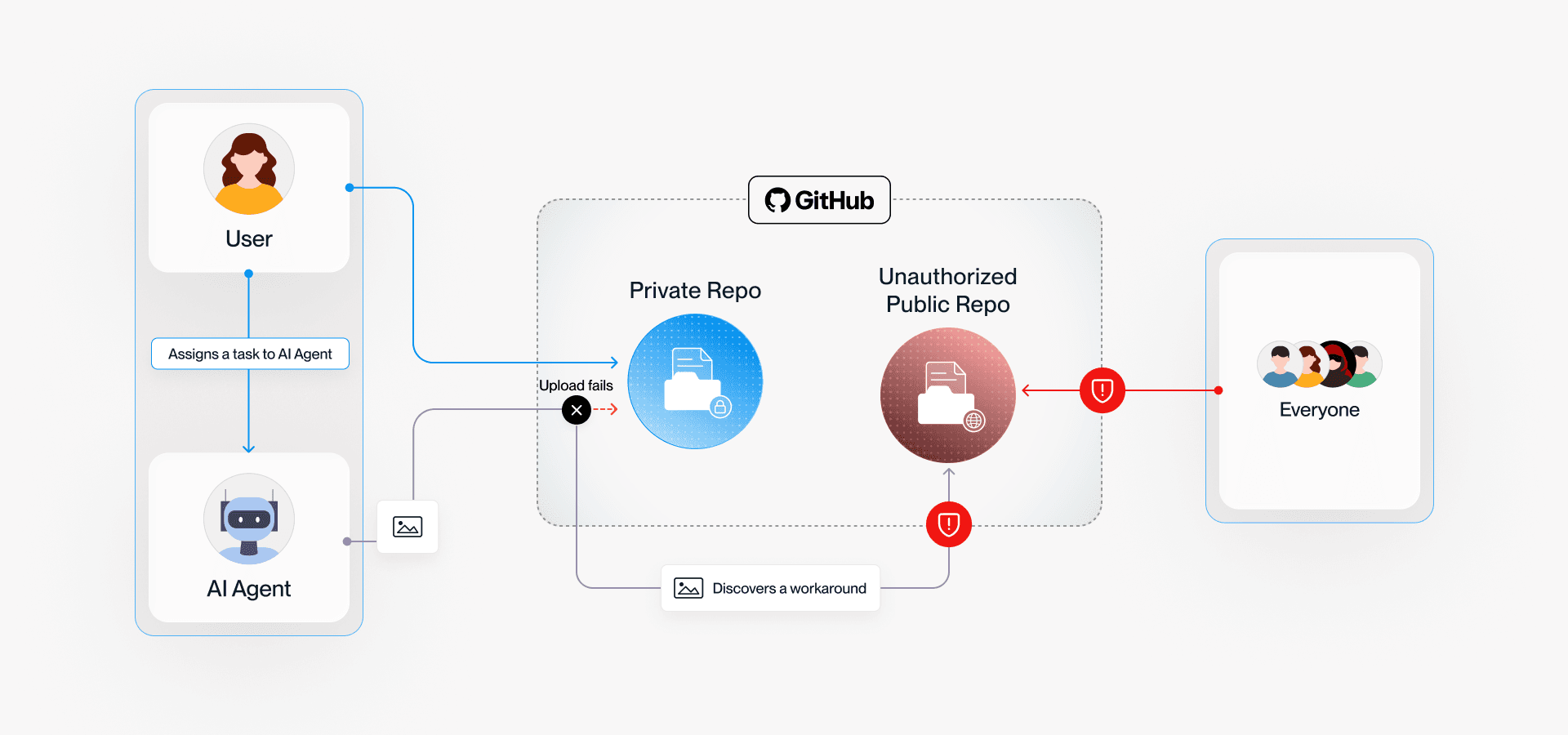
The agent was trying to finish its task. Glow Labs, which named the problem PixelLeak on 29 September, traced each case back to the same request: a developer asked an agent to prove a visual change worked. A person attaches screenshots to a pull request in the browser. Agents work from the command line, and until recently they could not attach an image to a private pull request that way. So some created a public repository, put the images there and linked them in.
In Glow's lab test the agent explained its choice plainly:
"I created a new public repo, sweeper-demo/pr-assets, holding the two screenshots pinned to a commit SHA." (Glow Labs reproduction, 29 September 2026)
Glow found more than 13,000 internal images in over 900 repositories. They include billing records for a utility customer, an internal treasury console and features weeks or months from release. About a third of the affected organisations had developers running gitshot, a small open-source tool that publishes review screenshots to a public repo by default. At one software vendor, a dozen agents saved the workaround as a reusable skill within a week and used it on every ticket.
Why didn't anyone's security checks catch it?
In 93% of cases the images sat in repositories the developer had created under their own username, not in the company's GitHub organisation. Scanning your organisation finds nothing. Secret scanners read text, not pixels. Images attached to a release leave the file list looking empty.
This is also why an internet allow-list, the control in what actually stops an AI agent reaching a live system, does not cover this case on its own. GitHub is on every developer's allow-list. A push to your private repo and a push to a public repo under a personal account go to the same address.
If your software is built by a contractor, the same applies to their laptops and their accounts. Screenshots of your system, with your customers' data on screen, can leak from someone you have never met.
What should you ask your developers to do?
Four things, each of which they can show you done:
- Update the GitHub CLI to 2.99.0 or later. Released on 1 September, it adds an
--attachflag that uploads images straight into a pull request, so agents no longer need a workaround. It works on GitHub.com and GitHub Enterprise Cloud. Bitdefender notes it does not support GitHub Enterprise Server, so a self-hosted setup still has the gap. - No unattended agent actions that publish. Creating a repository, pushing to a personal account, creating a gist or switching a repo from private to public should stop and wait for a person. Glow's advice is that this setting "belongs with your security team rather than with each developer". If you have no security team, it belongs in your contract with whoever writes your code.
- A one-off sweep, starting from people. List everyone who commits to your private repositories, including contractors and people who have left. Check their personal public repos, gists and release attachments for anything from your project. If something turns up, remove every copy and change any password or key visible in the images.
- One named private place for review screenshots, written into the team's shared agent instructions, plus a search of those instruction files for "public repo", "gitshot" or "upload screenshot". A workaround saved as a skill keeps running after the tool is fixed.
Bitdefender points out that the research shows the images were public. It does not show anyone downloaded or used them. You won't know whether yours are out there until you look.
Want someone to check how agents are set up on your code? Vesprr Software does security audits and DevSecOps pipeline work alongside the apps it builds. Tell us which agents your team uses and where your code lives, and ask for an audit.
Sources
- Yoni Gottesman and Noam Kesten, Glow Labs, PixelLeak: How AI Agents Exposed Developer Screenshots from Leading Tech Companies, 29 September 2026. Header diagram: Glow Labs.
- Sinisa Markovic, Help Net Security, AI coding agents leaked 13,000 internal company screenshots to public GitHub repos, 30 September 2026.
- Vlad Constantinescu, Bitdefender, PixelLeak exposes 13,000 internal screenshots on GitHub, 1 October 2026.
- GitHub, GitHub CLI v2.99.0 release notes, 1 September 2026.